Work with Navi
Suggestions
Review the next steps Navi finds for your site, links, search rankings, and AI visibility, then hand each to Navi, do it yourself, snooze it, or dismiss it.
Open Suggestions in SerpierSuggestions is the short list of next steps Navi finds for your projects, based on your website, SEO Performance, AI Visibility, and the Publication Tracker. You decide what happens to each one: hand it to Navi, do it yourself as a task, or put it off. Suggestions in the sidebar opens it on the home page, under Here's what I suggest, with Inbox, Snoozed, and History tabs. Publisher organizations do not have it.
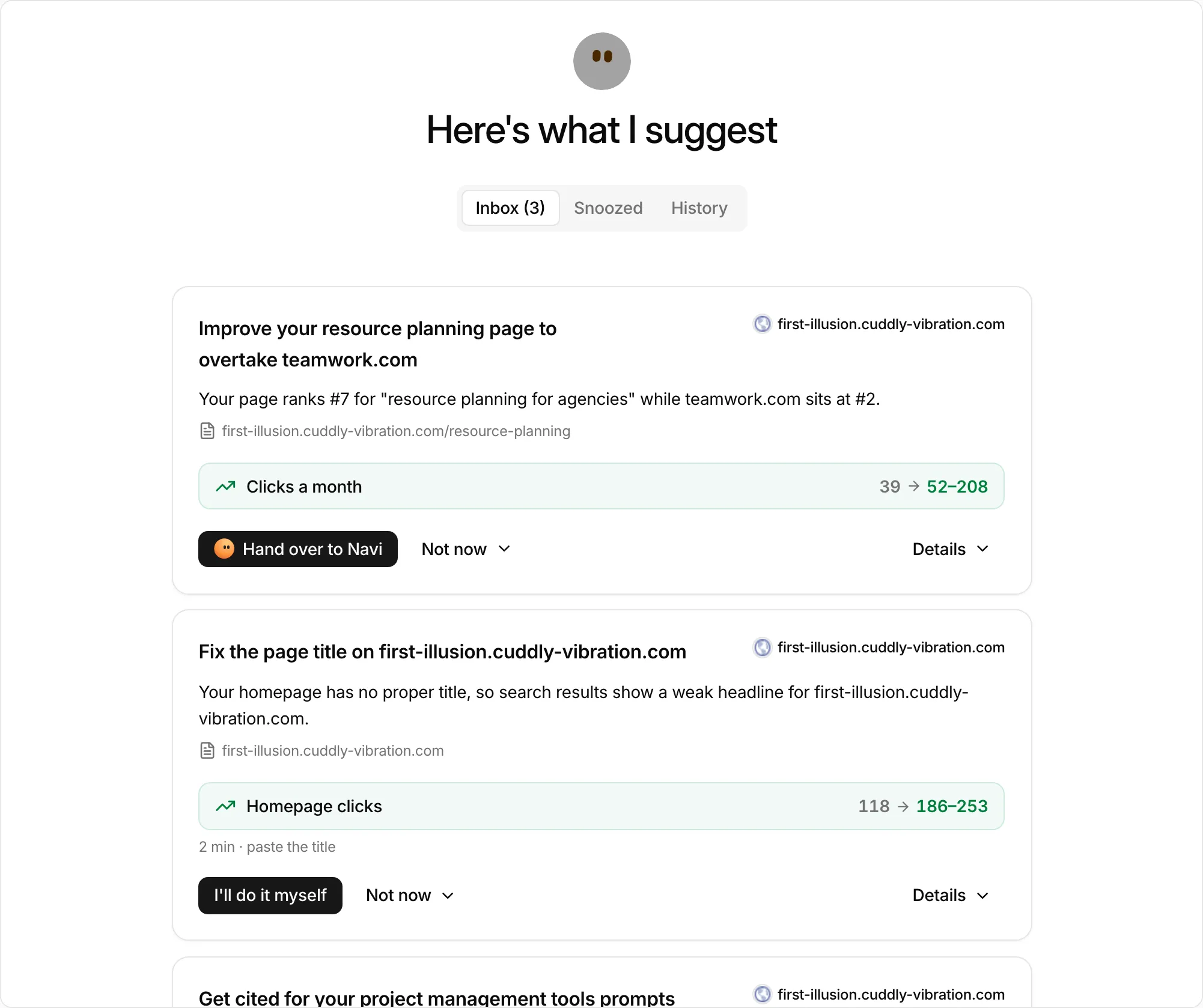
What Navi suggests#
Navi checks your website every week and suggests whatever looks like the easiest win right now: the step it expects to gain the most for the least effort. It brings each one to the inbox as soon as it finds it. A few examples:
- Order a placement from a shortlist of Marketplace publishers to push a keyword that sits just off page one.
- Fix a site basic, such as
robots.txt,llms.txt, the sitemap, or meta tags. - Repair a bought link that dropped or was deindexed.
- Speed up a slow page.
- Write a page for a keyword where competitors outrank you.
These are only examples. Navi is not limited to a fixed list, and suggests anything it finds worth doing for your site.
Each card says why it is there, with an estimated effect when Navi has one, such as load time or clicks. Details shows the brief, the proposed change, or the pages involved.
Confirm how Navi sees your business#
Before the first suggestions, you may get a card titled Check how Navi understands your site. It summarises your Business, Customers, Market, Offerings, what it Stands out for, and your Competitors. Navi works from this profile.
- Looks right confirms it.
- Edit lets you correct it first. Navi uses your version from then on.
Act on a suggestion#
The inbox shows a few suggestions at a time. Handling one brings in the next, and a link under the list says how many more are queued.
- Hand over to Navi: Navi does the work. For an order suggestion, choose a publisher from the shortlist first. Navi's work uses Navi credits (see Billing), and you approve before anything is bought or changed.
- I'll do it myself: adds the suggestion to your tasks without handing it to Navi. Content suggestions do not have this option, because Navi always writes the page.
- Connect: shown instead when Navi needs your site connected first. See Connections.
Snooze or dismiss#
Not now holds the rest:
- Snooze a week: the suggestion comes back to the inbox after a week. Until then it is on the Snoozed tab.
- Dismiss…: closes it. Pick a reason: Not relevant for us, Already done, Too expensive, Not a priority right now, or Something else. Navi learns from the reason.
History keeps the suggestions you accepted or dismissed in the last 30 days.
When the inbox is empty#
Nothing to act on right now means Navi has nothing new for you. While Navi is still reading a new site, the inbox says your first quick wins are on the way. If AI Visibility is not set up, the empty inbox offers Set up AI Visibility (or Upgrade to get AI Visibility).
Turn on New suggestions in your notification settings to hear when Navi adds one.